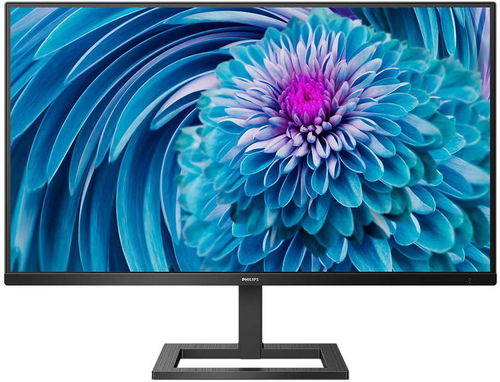
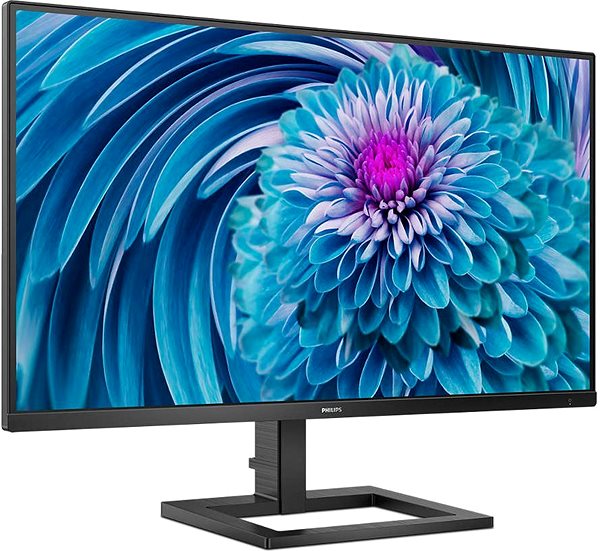
This Philips LCD monitor will expand your computer system with display panel boasting a screen size of 28". Its aspect ratio is 16:9. This LCD monitor works using IPS technology, which is well-known for its high colour quality and good viewing angles. The resolution of this monitor is 3840 × 2160. The fast response time of 4 ms is perfect for intense games and keeps the images very clear. Its refresh rate of 60 Hz is the usual standard. This Philips monitor is capable of a brightness of 300 cd/m2. For artists or graphic designers, colour intensity is one of the most important parameters there are. Luckily, the colour depth of the monitor is 10 bit.
28" Philips 288E2A LCD Monitor Key Features
Maximum supported resolution: 3840 × 2160
LCD monitor built with IPS technology
Anti-reflective surface of the LCD monitor provides a more effective working environment
4 ms response time and refresh rate of 60 Hz
Maximum brightness reaching 300 cd/m2
LCD monitor compatibility: 100×100 VESA mounting
Includes integrated speakers for audio playback
Blue light filter reduces eye strain
You can watch two pieces of content at once thanks to PIP (picture in picture) technology
28" Philips 288E2A Monitor Construction
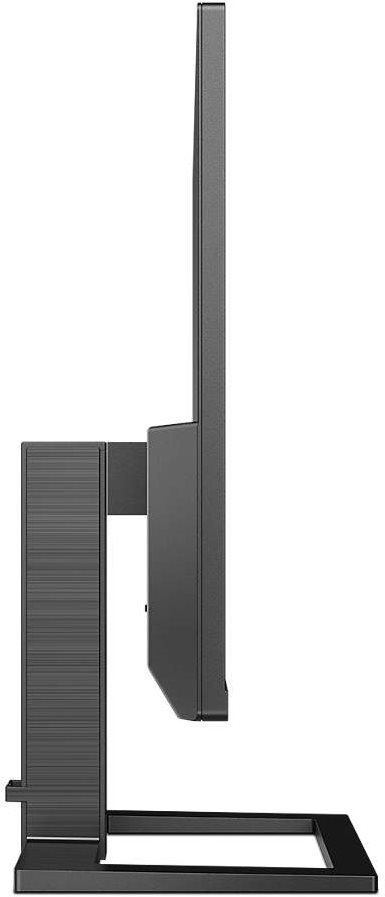
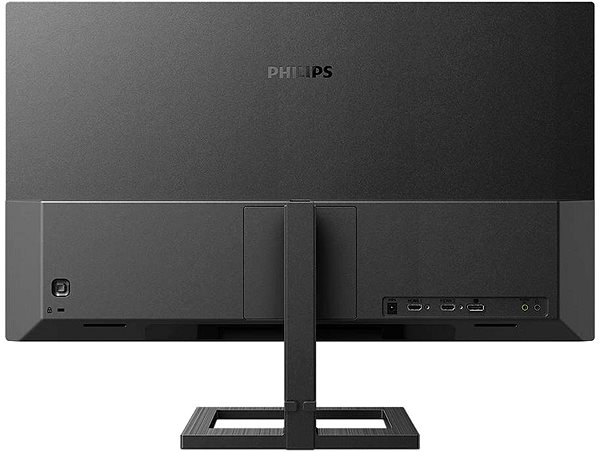
This Philips PC monitor has a size measuring 63.7 × 48 × 22.4 cm Besides a classic stand, the computer monitor can be mounted onto a wall with a VESA stand. The monitor model has a weight of 5.59 kg. A practical part of this monitor is its integrated speaker system. The audio quality is sufficiently powerful for most users. You can connect your headphones directly to this computer monitor.
Practical Functions of the 28" Philips 288E2A Monitor
If you often at night, you will undoubtedly appreciate the blue light filter on the monitor. It helps improve sleep quality. Flicker-Free mode provides an effective shield against eye fatigue by removing screen flickering. The 28" Philips 288E2A monitor also has support for the novel and practical PIP (Picture-in-Picture) function for displaying two separate video sources at once.
Denotes the distance between the lower left and upper right corner of the screen. It is quoted in inches,while 1 "= 2.54 cm. How big a diagonal measurement to choose with which device and what are the benefitsand the disadvantages?
The monitor resolution type refers to the number of pixels that can be displayed on the monitor screen. Choosing the right resolution type can have a significant impact on the overall experience of using your monitor, whether it's for work, gaming or watching movies.
Monitor resolution refers to the number of pixels on the monitor screen, expressed as width × height. Higher resolutions provide a more detailed and clearer image, while lower resolutions may be suitable for smaller monitors or to save power.
Denotes the distance between the lower left and upper right corner of the screen. It is quoted in inches,while 1 "= 2.54 cm. How big a diagonal measurement to choose with which device and what are the benefitsand the disadvantages?
The monitor resolution type refers to the number of pixels that can be displayed on the monitor screen. Choosing the right resolution type can have a significant impact on the overall experience of using your monitor, whether it's for work, gaming or watching movies.
Monitor resolution refers to the number of pixels on the monitor screen, expressed as width × height. Higher resolutions provide a more detailed and clearer image, while lower resolutions may be suitable for smaller monitors or to save power.
The sRGB colour coverage of a monitor is a measure of how much of the range of colours defined in the sRGB (Standard Red Green Blue) standard the monitor is able to display. A higher percentage of sRGB coverage means that the monitor can display a wider and richer range of colors.
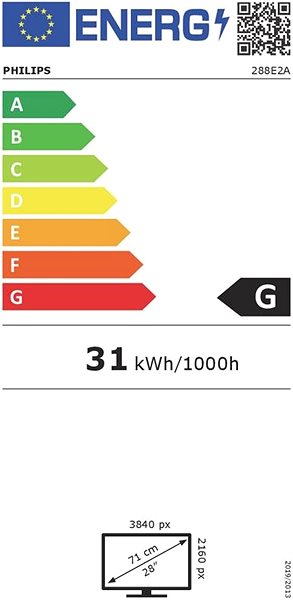
The European Commission has recently approved new energy labels for household appliances. You will find them in stores starting from the 2021. Which appliances are affected by the changes? What should the consumer prepare for and what will the new energy labels look like? In this article, we bring you an overview of the most important changes.
Specifications can be changed without notice. Images are for illustrative purposes only.
Dobrý deň, chcel by som sa opýtať v akej výške je monitor na stojane umiestnený, resp. ako vysoko je spodná hrana monitora od stola? Ďakujem za odpoveď
Dobrý deň, chcel by som sa opýtať v akej výške je monitor na stojane umiestnený, resp. ako vysoko je spodná hrana monitora od stola? Ďakujem za odpoveď
Zdravím, stáhnul sem si super návod v čěštině na oficiálních stránkách výrobce, ale ani tam jsem se nedozvěděl co to je vlastně ten SmartResponse a SmartFrame v Nastavení hry. Na výběr je u těchto dvou předvoleb toho celkem dost, tak bych chtěl poprosit o nějaké příklady u jakých her nastavit u toho tohle a u tamto zas tohle a nebo jestli je nějaký univerzální nastavení pro oba. Něco takového bych čekal, že v tom návodu najdu....
Dále potom u předvolby ve SmartImage - RTS, když si toto nastavím, tak mám v levo nahoře bílej čtverec, nevím jestli to tak má být a jestli ano, tak nevím k čemu to je.
A Nakonec moje třetí otázka u režimu LowBlue na šetření zraku vůči modrému světlu lze nastavit od 1 - 4 intenzitu potlačení, tak by mě zajímalo kolik kdo doporučuje, mezi 2-3 je největší skok, ale to mě zajímá čistě ze zvědavosti co kdo preferuje.
PS: Je to můj úplně první 4K monitor a nemám s nimi žádné předešlé zkušenosti. Každopádně jinak sem s monitorem naprosto spokojen.
Zdravím, stáhnul sem si super návod v čěštině na oficiálních stránkách výrobce, ale ani tam jsem se nedozvěděl co to je vlastně ten SmartResponse a SmartFrame v Nastavení hry. Na výběr je u těchto dvou předvoleb toho celkem dost, tak bych chtěl poprosit o nějaké příklady u jakých her nastavit u toho tohle a u tamto zas tohle a nebo jestli je nějaký univerzální nastavení pro oba. Něco takového bych čekal, že v tom návodu najdu....
Dále potom u předvolby ve SmartImage - RTS, když si toto nastavím, tak mám v levo nahoře bílej čtverec, nevím jestli to tak má být a jestli ano, tak nevím k čemu to je.
A Nakonec moje třetí otázka u režimu LowBlue na šetření zraku vůči modrému světlu lze nastavit od 1 - 4 intenzitu potlačení, tak by mě zajímalo kolik kdo doporučuje, mezi 2-3 je největší skok, ale to mě zajímá čistě ze zvědavosti co kdo preferuje.
PS: Je to můj úplně první 4K monitor a nemám s nimi žádné předešlé zkušenosti. Každopádně jinak sem s monitorem naprosto spokojen.
Dobrý den, monitor nezvládne duplikování obrazovky. Aktualizoval jsem všechny ovladače. Rozšíření obrazovky zvládá v pohodě, ale neumí duplikovat. Starý monitor to zvládal v pohodě. Jde to nějak vyřešit? Děkuji.
Dobrý den, monitor nezvládne duplikování obrazovky. Aktualizoval jsem všechny ovladače. Rozšíření obrazovky zvládá v pohodě, ale neumí duplikovat. Starý monitor to zvládal v pohodě. Jde to nějak vyřešit? Děkuji.
Dobrý den přeji, umí vůbec monitor zvuk z nižší verze HDMI, nebo akceptuje pouze HDMI 2.0? Obraz z UPC Setboxu HD Mediabox jde, ale bez zvuku. Zkoušel jsem všechny "hejblátka" na monitoru a bezúspěšně. Děkuji JCB
Dobrý den přeji, umí vůbec monitor zvuk z nižší verze HDMI, nebo akceptuje pouze HDMI 2.0? Obraz z UPC Setboxu HD Mediabox jde, ale bez zvuku. Zkoušel jsem všechny "hejblátka" na monitoru a bezúspěšně. Děkuji JCB
Magyarországra történő kiszállításért tekintse meg ezt a termékoldalt: 28" Philips 288E2A
Try our cookiesAlza.cz a. s., Company identification number 27082440, use cookies and other data to ensure the proper functioning of the website and, with your consent, also, among other things, to personalize advertising and the content of our websites. By clicking on the “I understand“ button, you agree to the use of cookies and the transfer of data regarding the behavior on the website for displaying targeted advertising on social networks and advertising networks on other websites.
We use 8 categories of cookies on our website:
Technical cookies
These are strictly necessary for the functioning of the website and the features you choose to use. Without them, our website would not work; you wouldn't be able to log in to your user account, for example.
Functionality cookies
These cookies allow us to remember your basic choices and improve the user experience. These include remembering your preferred language or allowing you to stay logged in permanently.
Social media cookies
These cookies allow us to easily link you to your social media profile and, for example, allow you to share products and services with your friends and family.
Content personalisation
These cookies allow us to show you content and ads according to the information we have about you to best meet your needs. This includes what content you have viewed, or on what device you are accessing our website.
Non-personalised advertising
These cookies allow us to show you general ads for products and services.
Personalised advertising
Thanks to these cookies, we and our partners can offer you relevant products and services based on your purchases, your shopping behaviour and your preferences.
Audience metrics
These cookies allow us to optimise our site for your convenience based on how you use it. The aim is to remember or anticipate your choices. This includes, for example, the use of features, their location, or the behaviour on the page.
By giving your consent to the processing of cookies, functionality and analytical cookies will be installed on the device you use to browse the website (click on the "I understand" button for both categories, or you can select only one of the categories by clicking on the "Settings" button). We always install technical cookies on your device, even without your explicit consent, because without them our website would simply not work.
You can revoke your consent to the processing of cookies. In connection with our company's cookie processing, you also have the following rights: the right to access cookies, delete, modify, supplement and correct them, restrict processing and the right to lodge a complaint with the Office for Personal Data Protection. Read more about your rights.