


Dobrý den. Kdy budete mít v nabídce Samsung Galaxy Tab S12+ ve verzi 512 GB? Děkuji za odpověď.


 Installment calculator
0%
interest
from 74.45 € monthly
Installment calculator
0%
interest
from 74.45 € monthly


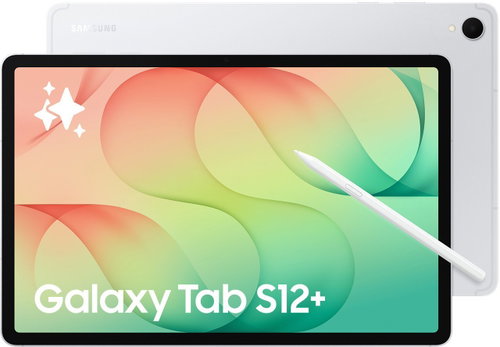
The Samsung Galaxy Tab S12+ tablet is wonderfully thin and light, adorned with a host of elegant details and available in two stylish colour options. It won't look out of place in any environment. Despite its large and bright 12.6" display, it's incredibly thin, measuring just 5.3mm and weighing only 555g. Combined with the hexagonal S Pen, it leaves a striking impression wherever you go. You can choose between grey and silver. The iconic design is highlighted by the integrated single-colour finish of the dual camera system, which gives the tablet its distinctive look.¹
Discover new and exciting ways to engage your imagination with the Creative Studio app on the Samsung Galaxy Tab S12+ and the hexagonal S Pen. This creative tool is powered by Galaxy AI with the integrated Nano Banana model and offers even more options for creating and enhancing images. You can turn drawings made with the S Pen into images, and with new templates, you can easily create personal stickers, invitations, pictures or profile cards. With the help of AI, you can seamlessly combine sketches, images and text prompts. Then add the final touches with the S Pen, which you'll find right in the box.²


With its 10600mAh battery, you can focus on your studies with the Samsung Galaxy Tab S12+ without worrying about running out of power. It can handle up to 21 hours of video playback on a single charge, giving you the freedom to stay productive from morning to night. Use your commute to get things done or study in a café after work. And when it's time to recharge, Super Fast Charging 2.0 gets you back to what matters quickly.³

Your bold ideas come to life on the large 12.6" Dynamic AMOLED 2X display of the Samsung Galaxy Tab S12+. It offers a bright picture both indoors and outdoors. Thanks to its thin bezel, the display provides an immersive experience whether you're sketching designs, editing projects or streaming your favourite shows. The Seamless Vision Booster feature automatically adjusts contrast and colour to match the ambient light. This keeps the image bright and sharp, even in direct sunlight.⁴
Thanks to helpful summaries from Note Assist on the Samsung Galaxy Tab S12+, you can focus on what's important. In the Samsung Notes app, simply tap the Galaxy AI button and select Summarise. This turns long notes into a concise overview. The summary appears in a practical split-screen view on the right side of the screen, so you can see the key points alongside your original notes. Choose between a standard and a detailed summary. You can then copy the result, replace the original text with it, or add it to the note. This makes it easy to organise your notes and seamlessly build upon them.⁵

Organise your documents and other resources with the advanced capabilities of Google AI Pro and Gemini Notebook on the Samsung Galaxy Tab S12+. Upload PDFs, presentations, web pages, images or voice recordings and ask questions directly about their content. Based on your materials, you'll get relevant answers and information to help you study, create and find solutions. You can also create audio overviews, presentations, flashcards, video summaries or quizzes from your resources. Then, you can comfortably view everything on the large display.⁶

Adobe Photoshop appears on an Android tablet for the first time, giving you access to professional creative features on the Samsung Galaxy Tab S12+. The interface, tailored for the tablet's display, creates an extensive workspace with plenty of room for precise detail work. The S Pen provides quick access to the Quick Tools menu. Thanks to its low latency, it responds to every stroke without noticeable delay. Edit high-resolution images, draw digital illustrations or work on your own designs from virtually anywhere.⁷

The Samsung Galaxy Tab S12+ tablet comes with pre-installed apps like Photoshop, Notability, Goodnotes, LumaFusion, Clip Studio Paint, and Notion. Right from the start, you can design, write and annotate notes, edit content, draw and plan tasks. You also have access to tablet-optimised apps like MyScript Notes, MyScript Math, Noteshelf 3, and ArcSite. They're designed to run smoothly and enhance your creative process and daily use.⁸

An advanced processor and an improved 3D vapour chamber give the Samsung Galaxy Tab S12+ next-generation speed. It stays cool even under heavy loads. Upgraded CPU, GPU, and NPU units speed up your work, whether you're rendering complex graphics, working in multiple apps at once, or using AI features and entertainment. The improved cooling system dissipates heat faster, so you can edit high-resolution videos, collaborate on demanding projects and immerse yourself in games without performance limitations.⁹

With an IP68 rating for water and dust resistance, the Samsung Galaxy Tab S12+ is ready to handle whatever your day throws at it.¹⁰

Listen to the rich and immersive surround sound offered by the Samsung Galaxy Tab S12+'s quad-channel audio system. A powerful setup of 4 speakers creates a wide and realistic soundstage with balanced audio that fills the entire room. Movies and music will surround you from all sides. Whether you're streaming your favourite series, watching a live concert, or listening to a podcast on your break, the audio system recognises the content type and automatically adjusts the sound settings. The result is a clean, full, and engaging listening experience.¹¹

Use the Samsung Galaxy Tab S12+ for convenient multitasking in a PC-like environment. You have up to 4 desktops, and you can easily switch between them and move apps as needed. Previews of each desktop are displayed at the top of the screen, so you can quickly find your way around. If you want to have multiple apps open at once, pin one to the side of the screen. The tablet will then suggest another from your most recently used apps to display next to it.¹²

Up to 7 operating system updates along with security support help keep the Galaxy Tab S12+ up-to-date and protected, even with long-term use.¹³


1. Colour and model availability may vary by country, region, or carrier. Weight is for the Galaxy Tab S12+ Wi-Fi model (553g). The Galaxy Tab S12+ 5G model weighs 555g.
2. Creative Studio requires a network connection and a Samsung Account login. Service availability may vary by country, language, or device model. The accuracy and reliability of the generated output are not guaranteed. Sticker packs are only compatible with the Samsung Keyboard and can only be shared via Quick Share with other Galaxy devices running One UI 5.0 or later and Quick Share version 13.8.50.x or later. Image contains elements created by artificial intelligence.
3. Typical value tested under third-party laboratory conditions. Typical value is the estimated average value considering the deviation in battery capacity among the battery samples tested under the IEC 61960 standard. Rated (minimum) capacity is 10392mAh. Based on Samsung internal testing with a pre-release version of the model connected to headphones via Bluetooth at default settings over an LTE network. The estimate is based on battery capacity and measured current over battery power consumption during video playback (video file resolution 720p, saved on the device). Actual video playback time varies by network connection, settings, file format, screen brightness, battery condition, and many other factors. *Super Fast Charging speed may vary depending on charging conditions and other factors. We recommend using an original Samsung data cable. Image contains elements created by artificial intelligence.
4. Compared to previous Galaxy Tab S Plus models. Model availability may vary by country, region or carrier. The Galaxy Tab S12+ display size is 12.6 inches in the full rectangle and 12.5 inches accounting for the rounded corners, measured screen sizely. The actual viewable area is smaller due to the rounded corners. The Galaxy Tab S12+ supports a maximum brightness of 1600 nits and an outdoor brightness of 1000 nits in high brightness mode.
5. Note Assist requires a Samsung Account login. Available features may vary by country, region, and language. Image contains text generated by artificial intelligence.
6. We recommend verifying the accuracy of the answers. Features and their availability vary by region and age. Gemini is a trademark of Google LLC. Feature availability may vary. Some features may not be available and may be subject to usage restrictions. Terms and conditions apply. By subscribing, you agree to the terms of service for Google One, YouTube and the respective offers. Offer valid until 2 August 2027 at 07:59 GMT+1. If you do not cancel your subscription beforehand, you will be charged $19.99 per month for Google One after the trial period ends. You can cancel your subscription at any time. Returning a purchased device may result in cancellation of the subscription. For the full terms and conditions, visit https://one.google.com/offer/terms-and-conditions/SamsungAIPro.
7. Adobe Photoshop is pre-installed on the Galaxy Tab S12+ in the Galaxy Picks folder. Adobe Photoshop for tablets will be exclusively available in the Galaxy Store for at least six months from 7 October 2026. After this period, Adobe may make the app available in other app stores. Galaxy Tab S12+ users are entitled to a 4-month free subscription to Adobe Photoshop Premium for mobile, which includes 100 generative credits per month. Image contains elements created by AI.
8. App availability, benefits, and terms may vary by country or region. Requires a Clip Studio Paint membership. New users can get a 6-month free trial, after which a subscription is required. A 20% discount applies to the first subscription. The Notion and Notability apps must be downloaded from the Galaxy Store. The Goodnotes, Notion and Notability apps include free periods of 1 year, 1 month (Business trial for 1 new workspace) and 6 months, respectively. Further purchases may be required to continue using Goodnotes or Notability after the free period expires. The free trial of the Adobe Photoshop mobile app is subject to Adobe's standard terms and conditions. The LumaFusion app is pre-installed as a trial version; tap the icon to complete your purchase in the Galaxy Store. Galaxy device users receive a 66% discount in the Galaxy Store and a 30-day free Creator Pass subscription. Offer valid until 31 December 2027. Image contains text generated by artificial intelligence.
9. Improved performance data is based on a comparison of the Galaxy Tab S12+ with the Tab S10+. The 3D vapour chamber in the Galaxy Tab S12+ helps dissipate heat faster and more efficiently compared to the flat chamber in the Tab S10+. Actual performance depends on the user environment, conditions, and pre-installed software and applications.
10. The Galaxy Tab S12+ and S Pen (included) are IP68 rated according to the IEC 60529 standard. Based on lab test conditions for submersion in up to 1.5 metres of freshwater for up to 30 minutes (IP68). Not advised for beach or pool use. The device's water and dust resistance is not permanent and may diminish over time due to normal wear and tear. The dust resistance rating was tested under third-party laboratory conditions: 2kg of talc powder (with a maximum particle diameter of 0.05mm) per cubic metre was blown into a test chamber housing the device (air pressure inside the device was kept below the surrounding air) for 2 hours. Rated IP6X. Dust resistance may vary depending on actual usage conditions.
11. Image contains text generated by AI.
12. Image is simulated for illustrative purposes only. Up to four desktops are available, with a maximum of five apps open on each at the same time. Some apps may not work in Samsung DeX mode or may require a separate paid licence. Image contains text created by artificial intelligence.
13. The availability and timing of OS and security updates may vary by device model and market.
Is there any performance difference between the Galaxy Tab S12+ and Tab S12 Ultra?
Both the Galaxy Tab S12+ and Tab S12 Ultra models are equipped with the top-of-the-line 3nm MediaTek Dimensity 9500 processor. Performance has significantly improved over the previous Galaxy Tab S10+ model: the NPU is 141% faster, the CPU is 48% faster, and the GPU is 67% faster—all in a more compact design.
*The availability and timing of operating system updates and security updates may vary by device model and market.
Does the Galaxy Tab S12+ have an improved cooling system?
Yes. For efficient heat dissipation, the Galaxy Tab S12+ is equipped with a newly designed 3D vapour chamber. This improved solution is an advancement over previous vapour chamber designs and helps maintain consistent performance and regulate temperature even during heavy use.
*Compared to earlier models with a flat vapour chamber. Cooling performance may vary depending on the current load and ambient conditions.
What are the memory and storage configurations for the Galaxy Tab S12+?
The Galaxy Tab S12+ offers 12GB of memory and up to 512GB of storage, with configurations starting at 256GB of storage. All models are equipped with a microSD card slot, allowing for storage expansion up to 2TB.
*Memory and storage options and availability may vary by country, region, or carrier. Actual storage availability may vary depending on pre-installed software. A microSD card is sold separately.
How portable and durable is the Galaxy Tab S12+?
The Galaxy Tab S12+ is just 5.3mm thick—thinner than the Galaxy Tab S10+ (5.6mm)—and weighs only about 553g. It also boasts an IP68 water and dust resistance rating, ensuring greater durability and peace of mind when using it outdoors or on the go.
*The Galaxy Tab S12 Ultra has an IP68 rating according to the IEC 60529 standard. The rating is based on lab test conditions for submersion in up to 1.5 metres of freshwater for up to 30 minutes (IP68). Not advised for beach or pool use. The device's water and dust resistance is not permanent and may diminish over time due to normal wear and tear. Dust resistance was tested under third-party laboratory conditions: 2kg of talc powder (max. particle diameter of 0.05mm) per cubic metre was blown into a test chamber with the device for 2 hours, with the air pressure inside the device kept lower than its surroundings. Rated IP6X. Actual dust resistance may vary depending on usage conditions.
How has the display improved compared to the previous Galaxy Tab S10+ model?
Compared to the Galaxy Tab S10+, the Galaxy Tab S12+ has a larger display, with the screen size size increased from 12.4" to 12.6". The bezel has also been narrowed from 8.1mm to 7.9mm, while the maximum brightness has increased from 650 nits to 1600 nits.
*The Galaxy Tab S12+ display size is 12.6" in the full rectangle and 12.5" accounting for the rounded corners; measured screen sizely. The actual viewable area is smaller due to the rounded corners.
Does the Galaxy Tab S12+ display automatically adapt to changing ambient light conditions?
Yes, the Seamless Vision Booster feature automatically adapts the Galaxy Tab S12+ display based on different lighting conditions. The brightness and contrast are continuously and smoothly optimised according to the ambient light, ensuring a vibrant yet comfortable viewing experience.
*Seamless Vision Booster helps to optimise brightness and contrast in real-time according to the ambient light level.
What are the main differences between the Galaxy Tab S12 Ultra and Tab S12+ tablet models?
The Galaxy Tab S12 Ultra is a premium model with a large 14.6" display, an 11600mAh battery, Wi-Fi 7 technology, and an ultra-slim 5.1mm profile, offering powerful performance and enhanced productivity. The Galaxy Tab S12+, on the other hand, emphasises portability with its 12.6" display, a lightweight design of 553g (Wi-Fi model) or 555g (5G model), and a thickness of 5.3mm. Both models are equipped with the same MediaTek Dimensity 9500 processor. The choice depends on your needs—whether you prefer the larger display and higher productivity of the Galaxy Tab S12 Ultra, or the more compact and portable design of the Galaxy Tab S12+.
Can the Galaxy Tab S12+ replace a laptop?
The Galaxy Tab S12+ combines productivity with exceptional portability, weighing just 553g. Its 12.6-inch display, Keyboard Cover and Samsung DeX interface provide a compact alternative to a laptop. With the 3nm MediaTek Dimensity 9500 processor, it easily handles multitasking and creative tasks, while premium apps like Photoshop, Notability, and Clip Studio Paint offer professional-grade tools. If you prefer maximum portability, the Galaxy Tab S12+ offers a laptop-like experience while maintaining productivity in a lighter and more compact package compared to the Galaxy Tab S12 Ultra.
Is the S Pen included with the Galaxy Tab S12+?
The Galaxy Tab S12+ comes with an S Pen that you can use right out of the box. The package includes the tablet, the S Pen, a USB-C to USB-C data cable (3A, 1.0m), a SIM ejector tool, and a quick start guide. The charging adapter is not included.
How does the S Pen mimic the natural feeling of writing by hand?
The included S Pen responds with minimal latency, delivering precise strokes and an authentic writing feel.
What accessories are compatible with the Galaxy Tab S12+?
Compatible accessories include the Pro Keyboard (aluminium body, 1.0mm key travel, 8968mm² trackpad, Galaxy AI key), Protective Cover (lightweight with a universal stand), Keyboard Cover (improved lightweight design with a Galaxy AI key), and a Screen Protector Film (1.8% low reflectivity). All accessories are sold separately, and the Frame Cover is available exclusively for the Ultra model.
What is the battery life of the Galaxy Tab S12+?
With its 10600mAh battery, the Galaxy Tab S12+ offers up to 21 hours of video playback on a single charge, an increase of approximately 5 hours over the previous Galaxy Tab S10+ model.
*Typical value tested under third-party laboratory conditions. The rated (minimum) capacity of the Galaxy Tab S12+ is 10392mAh. Actual video playback time varies depending on network connection, settings, file format, screen brightness, battery status, and many other factors. Fast charging speed may vary depending on charging conditions and other factors. A 45W travel adapter is sold separately.
Does the Galaxy Tab S12+ support quad-channel surround sound?
Yes. The Galaxy Tab S12+ has been enhanced with quad-channel surround sound delivered by 4 speakers. This system creates an immersive surround audio experience, making you feel as if the sound waves are coming at you from all directions. Even two-channel audio is processed into a four-channel format, delivering an even more intense listening experience across different types of content.
*Compatibility with Dolby Atmos and multi-channel audio formats may vary depending on the streaming platform, region, and media file format. Audio optimisation is designed for an immersive listening experience in an indoor environment.
What AI features are supported on the Galaxy Tab S12+?
The Galaxy Tab S12+ supports a wide range of AI features, including Now Nudge, which suggests next steps in multi-window mode; Ask Anything in Samsung Browser, which provides instant answers based on the currently open page and tabs; and the personalised Now Brief feature for tailored content recommendations. The App Auto Actions feature simplifies multi-step tasks, while Creative Studio transforms sketches made with the S Pen into professional artwork. You can freely switch between dynamic AI assistants—including Bixby, Gemini, and Perplexity—for flexible AI assistance tailored to your needs.
*Use of some AI features may require a Samsung Account login. Samsung makes no promises, assurances, or guarantees as to the accuracy, completeness, or reliability of the output provided by AI features. The availability of Galaxy AI features may vary by region/country, OS/One UI versions, device models, and carriers. The basic Galaxy AI features provided by Samsung are free. Future versions may include enhanced features or new services that will be offered for a fee. AI features provided by third parties may be subject to different terms. Basic Galaxy AI features are the services listed in the Advanced Intelligence section of Samsung's current Terms of Service. Galaxy AI may be restricted for minors in certain regions where there is an age restriction for AI use.
How do I launch AI assistants like Bixby or Gemini?
You can activate the AI assistant by pressing the Galaxy AI button on the Pro Keyboard with Touchpad or Keyboard Cover, holding the side button, or using the voice commands "Hi Bixby," "Hey Google," or "Hey Perplexity."
*Using some AI features may require a Samsung Account login and an internet connection. You can customise the AI assistant to your preferences.
What can the new Ask Anything feature do?
Ask Anything is a new AI-powered browser feature that works with the current page, open tabs, and browsing history. It will answer your questions, summarise page content, or help you quickly find the best deals.
*The Ask Anything feature is available in select countries (including the US and Korea) and supports 8 languages (Korean, English, German, French, Italian, Spanish, Portuguese, and Japanese). A Samsung Account login and internet connection are required.
Can AI perform multi-step tasks across apps on the Galaxy Tab S12+?
Yes. With the App Auto Actions feature, AI-powered assistants can handle multi-stage tasks. For example, you can ask Gemini to book you a flight on Skyscanner and a hotel on Trip.com, and it will handle the entire process for you.
*AI automation features may vary depending on partner app APIs and regional conditions. Samsung makes no promises, assurances, or guarantees as to the accuracy, completeness, or reliability of the output provided by AI features.
What can I customise with the Now Brief feature?
Now Brief displays content based on your preferences in one place and helps you get a handle on your daily schedule. It offers content suggestions from YouTube, Spotify, or Netflix and makes planning easier. You can customise the individual cards to track things like YouTube videos, weather, calendar, and more.
*The Now Brief feature requires an internet connection and linking your account with supported third-party apps (YouTube, Spotify, Netflix). The actual user interface and experience may vary.
As a Galaxy Tab S12+ user, do I get free access to creative apps?
If you are a Galaxy Tab S12+ user, you can enjoy a free four-month subscription to Adobe Photoshop with an enhanced mobile UI and AI features through Galaxy Picks, a free six-month subscription to Notability Plus, a free six-month subscription to Clip Studio Paint EX, a free one-month subscription to Notion Business, and a free one-year subscription to Goodnotes Essential.
*App availability, benefits, and terms may vary by country or region. Requires a Clip Studio Paint membership. Available pre-installed in select markets or through the Galaxy Store. New users can get a 6-month trial. After the free trial period ends, a paid subscription on a monthly or annual plan is required for continued use. A 20% discount applies to the first subscription. The Notion and Notability apps must be downloaded separately from the Galaxy Store. The Goodnotes, Notion and Notability apps include free periods of 1 year, 1 month (Business trial for 1 new workspace) and 6 months, respectively. Further purchases may be required to continue using Goodnotes and Notability after the free period expires. The Adobe Photoshop free trial is subject to Adobe's standard terms. The LumaFusion app is pre-installed as a trial version; tap the icon to complete your purchase in the Galaxy Store. Galaxy device users get a 66% discount in the Galaxy Store and a 30-day free Creator Pass subscription. Offer valid until 31 December 2027.
How long is the software support for the Galaxy Tab S12+ model?
The Galaxy Tab S12+ offers up to 7 operating system updates and long-term security support for a higher level of protection.
*Operating system updates are dependent on device compatibility and hardware capabilities. The availability and timing of security updates may vary by market. A total of 7 software updates will be provided, starting from the year the device is launched globally.

Samsung Electronics Czech and Slovak, s.r.o., V parku 2323/14, Chodov, 148 00 Praha 4, 800 726 786, [email protected]
Creating a better world – the immodest vision which has driven Samsung since its inception in 1938. The courage to invest in the development of new technologies is typical for the company, as evidenced by a series of visionary solutions. Currently, Samsung is the largest group of companies in South Korea and the third largest worldwide conglomerate by revenue.
Samsung consumers associate the brand with high-quality consumer electronics. It is known for its Galaxy series, one of the best and most sought after mobile phones in its class. One must also mention Samsung TVs, where the company has long been at the cutting edge in technology and quality. The competence of the company is much broader. It is active in machinery and heavy industry, chemicals, construction, retail, and financial services.
.
Specifications can be changed without notice. Images are for illustrative purposes only.
