


Umí tato stanice klonovat i částečně nečitelné disky?
AXAGON ADSA-M2C, Dual M.2 NVMe SSD CLONE MASTER Dock, SuperSpeed USB-C 10Gbps
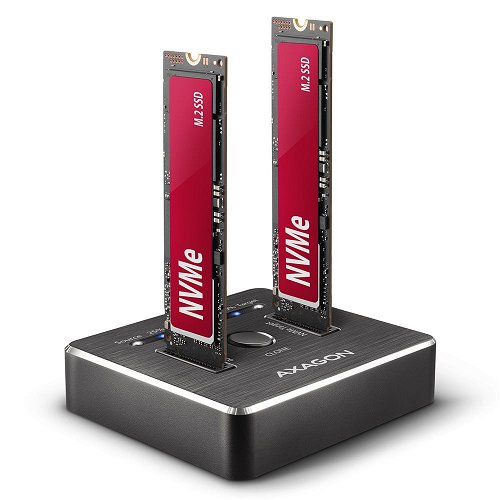
External Docking Station - for M,2 2230, M,2 2242, M,2 2260, M,2 2280 and M,2 22110 disks, interface: USB 3,2 Gen 1 and USB 3,2 Gen 2, connector(s): USB-A and USB-C, max. disk capacity of 16TB
Show full description
97.90 €
Price Guarantee
Shop faster with pickup at AlzaBox or in-store.
Warranty 36 months
Code:
AG304a1
Producer's Website:

AXAGON ADSA-M2C, Dual M.2 NVMe SSD CLONE MASTER Dock, SuperSpeed USB-C 10Gbps
97.90 €
In stock > 5 pcs
Buy
AXAGON ADSA-M2C, Dual M.2 NVMe SSD CLONE MASTER Dock, SuperSpeed USB-C 10Gbps
USB-C 10Gbps docking station for 2× M.2 NVMe SSDs
The AXAGON ADSA-M2C CLONE MASTER high-speed docking and cloning station with a 10Gbps USB-C interface allows you to work with up to two NVMe M.2 SSDs. Without being connected to a computer, it can clone one source drive to a second target drive. When connected to a computer, it provides access to up to two separate storage drives simultaneously. It is suitable for quickly formatting, erasing, testing and preparing NVMe drives, for example during data migration, system installation, servicing or backups. The chipset ensures stable performance even under prolonged load and minimises thermal throttling. The pack also includes 10Gbps USB-C and USB-A cables.


Key features of the AXAGON ADSA-M2C external docking station, dual M.2 NVMe SSD CLONE MASTER dock, SuperSpeed USB-C 10 Gbps
- UASP (USB Attached SCSI) support for faster data transfer in Windows 8 and later
- Support for the TRIM function to limit the gradual degradation of SSD performance over time
- Support for booting from an SSD
- Full Plug and Play support
- The option to clone discs without connecting to a PC
- Easy, tool-free disc insertion
- Indicating the cloning process using LEDs
- An aluminium body with an integrated counterweight for greater stability, and rubber feet to prevent it from sliding across the table

Cloning discs without a computer
The ADSA-M2C device can copy the contents of one NVMe M.2 SSD to another drive without the need for a computer or laptop. Simply insert the source drive into the NVMe Source slot and the target drive into the NVMe Target slot, press the button to start cloning, and monitor the progress via the LED indicator. This standalone process, which does not involve the operating system, runs securely and reliably, as the OS cannot affect the data. The button-activated start also reduces the risk of accidental operations. The result is an exact copy of the entire drive, including the Windows, macOS or Linux operating system. The drive copies block by block (LBA), so the duration of the cloning process depends on the capacity of the source drive, not on the amount of data stored. The destination drive must have the same or greater capacity than the source drive.

Stable and fast data transfer
The 10 Gbps USB interface (USB 3.2 Gen 2) offers a theoretical throughput of up to 10 Gb/s. The docking station is optimised for simultaneous operation with multiple SSDs, whether for cloning, data transfer or everyday use. The actual speed is also influenced by the type and generation of the M.2 SSDs used. The advanced ASMedia ASM2362 chipset helps maintain a stable transfer rate even under heavy loads and during prolonged operation. This ensures that data transfer is smooth, without significant fluctuations, and that the performance of the connected SSDs can be utilised effectively.

Two drives in the system, quick replacement and wide compatibility
Once the docking station is connected to the computer, both installed drives will appear as separate drives. You can work with them independently or simultaneously, copy data or use them for storage management. The open design allows for quick SSD replacement without the need for screws and saves time when working with multiple drives. The two slots also allow you to set up a software RAID, for example to provide enhanced data protection in both Windows and macOS. In Windows, the ‘Storage Spaces’ tool is used for configuration; in macOS, the ‘RAID Assistant’ in Disk Utility. The ADSA-M2C is compatible with MacBooks, other USB standards and Thunderbolt 3, 4 and 5 interfaces. It supports NVMe M.2 SSDs with no capacity restrictions, as well as UASP, TRIM (NVMe DEALLOCATE) and S.M.A.R.T. technology. It also features Plug and Play and a power-saving mode.

Passive cooling via an aluminium heat sink
The operation of NVMe SSDs increases the thermal load on the entire docking station. The aluminium casing effectively dissipates the heat generated and improves the device’s thermal stability. The robust metal construction also ensures reliable operation during long-term use and intensive data transfers. The rubberised base prevents the docking station from sliding across the desk and enhances stability whilst in use.

A full set of equipment for quick commissioning
The pack contains a cloning station, a 10Gbps USB-C to USB-C cable and a USB-C to USB-A cable for connecting to a computer, an external power adaptor and a multilingual user guide.
Input:
• USB 10Gbps (USB 3.2 Gen 2), USB-C female connector
•Compatible with USB 5Gbps, USB 20Gbps, USB 40Gbps and Thunderbolt 3 / 4 / 5.
Device support:
•2× NVMe M.2 SSDs.
• Designed for M-key or B+M-key cards.
•2× NGFF 75-pin M-key slots for M.2 drives.
• No limit on maximum drive capacity.
Drive cloning function:
• Cloning takes place without connecting the docking station to a computer.
• The NVMe Source slot is used to connect the source drive.
• The NVMe Target slot is used to connect the target drive.
• The target drive must have the same or greater capacity than the source drive; otherwise, cloning cannot be initiated.
• SSD cloning speed of up to 1000 MB/s.
• The total cloning time depends on the speed of the drives used and the capacity of the source drive, not on the volume of data on the drive.
•Approximate cloning time for 1 TB of data: 1→1 drive approximately 18 minutes (tested with a PCIe 4.0 NVMe M.2 SSD with a speed exceeding 4000 MB/s and a large cache).
USB 10 Gbps chipset for NVMe M.2 SSDs:
• ASMedia ASM2362 chipset.
• Maximum docking station throughput of up to 10 Gbit/s.
• When both drives are in use simultaneously, performance is split to up to 5 Gbit/s per drive.
Maximum theoretical speeds and compatibility with USB controllers (ports):
•Laptop / PC with a 10 Gbps USB port (USB 3.2 Gen 2): maximum speed 10 Gbit/s.
•Laptop / PC with a USB 5Gbps port (USB 3.2 Gen 1 / USB 3.0): maximum speed 5 Gbit/s.
• When connected to USB 20Gbps, USB 40Gbps or Thunderbolt 3 / 4 / 5 ports: maximum speed 10 Gbit/s. The actual throughput / transfer rate of the docking station, around 1000 MB/s (1 GB/s), is based on the limits of the USB 3.2 Gen 2 interface.
Additional features:
•Support for M.2 drives in the 2230, 2242, 2260, 2280 and 22110 mm formats.
• Support for both single-sided and double-sided M.2 SSDs.
•Complies with the PCI Express Base Specification Revision 3.1a.
• Complies with the NVM Express 1.3c specification.
• Complies with the USB Mass Storage Class specification.
• Support for BOT (Bulk-Only Transport).
• Supports UASP (USB Attached SCSI) for faster data transfer in Windows 8 and later.
• Supports the TRIM command via UNMAP and NVMe DEALLOCATE operations to limit the gradual degradation of SSD performance over time.
• Support for S.M.A.R.T. (Self-Monitoring, Analysis, and Reporting Technology), a system for monitoring the drive’s status.
• Support for booting from the SSD.
• Full Plug and Play support.
• A higher surface temperature of the docking station is not a fault – thanks to the aluminium casing, the heat generated by the drive’s operation is better dissipated and transferred to the surroundings.
•Compatible with Windows software RAID (Storage Spaces) and macOS RAID (Disk Utility – RAID Assistant).
Further details:
• Docking station dimensions: 68 × 68 × 17 mm (W × D × H).
• Docking station weight: 94 g (excluding cable and drive).
Power supply:
• Powered by the included 5V-3A external AC/DC adaptor with a 150 cm cable.
LED indicators:
•2 × LEDs (Source, Target) on each drive indicate that the drive is connected by a steady light and that data is being transferred by flashing.
• 4 × LEDs display the cloning progress: 25% – 50% – 75% – 100%. Once cloning is complete, the LEDs remain lit steadily.
Supported operating systems:
• Windows 8.1 / 10 / 11 and later, macOS, iPadOS, iOS, Linux, Chrome OS and Android.
•Compatibility depends on the operating system version and support from the device manufacturer.
Package contents:
• USB-C 10Gbps docking station for 2× NVMe M.2 SSDs.
• 25 cm USB-C to USB-C cable.
• 25 cm USB-C to USB-A cable.
• 100–240V / 5V-3A power adaptor.
•Multilingual manual: CZ / DE / DK / ENG / ESP / FIN / FR / GR / HR / HU / IT / NL / PL / PT / RO / RU / SK / SWE / TR / BG / CN / ARA. Packaged in a cardboard box.
Specifications
Drive interfaces
Supported disk formats
Number of free drive bays
Maximum total capacity
Connectors
Supported drives
Drive interfaces
Supported disk formats
Number of free drive bays
Maximum total capacity
Connectors
Connectors
Standards
Features and functions
Features
Material
Material
Dimensions and weight
Width
Height
Depth
Weight
Packaging
part of the package
Laptop power port
Power supply (cable)
Laptop power port
Most common ports
Common data ports
Data ports - Number and standards
USB-C standards
M.2 standards
Power ports for electrical devices
USB-C
Features
Colour
Material
Packaging
Package contents
Compatibility
Type
Dimensions and weight
Weight
More Specifications
Note:
Specifications can be changed without notice. Images are for illustrative purposes only.
