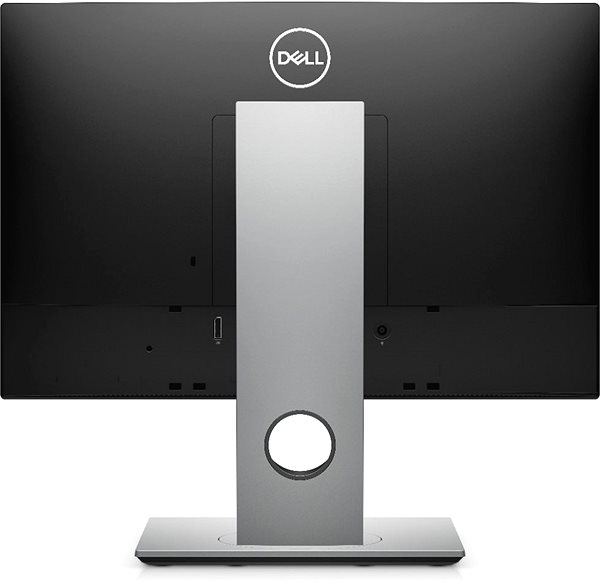
All In One PC 21,5" 1920 × 1080, Intel Core i3 10100T Comet Lake 3,8 GHz, Intel UHD Graphics 630, RAM 8GB DDR4, SSD 256GB, Without Optical Drive, Wi-Fi, DisplayPort, 3× USB 3.1, 2× USB 2.0, Case Type: All In One, Windows 10 Pro
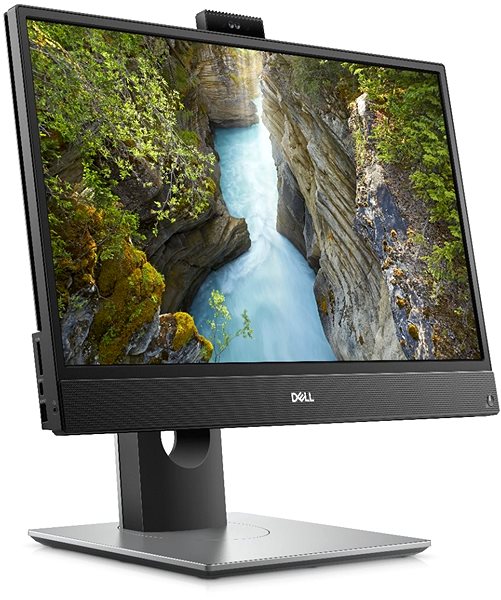
The all in one pc is a very versatile computer. All of this computer's components are held within the monitor, and the computer is completely wireless. The Dell OptiPlex 3280 model has a monitor measuring 21,5" are is powered by the Intel Core i3 power-saving processor, meaning that it is perfect for basic office work. The display presents standard Full HD resolution, which is great for working and watching films or television programs. Thanks to the technology used, the screen has deep colour contrast and good viewing angles. One big advantage of the Dell all in one pc is that you can connect to WiFi, so you will not be tied down by complicated cables. The webcam on this model is also something you will not find on a traditional monitor. This versatile all-in-one even has a memory card reader, which will certainly be appreciated by photo enthusiasts. has an optical drive for CDs and DVDs, and it has a memory card reader, which will certainly be appreciated by photo enthusiasts. The operating system on this computer is Windows 10 Pro. The Dell OptiPlex 3280 all in one pc includes an indispensible mouse and keyboard, meaning you can use it right when you unpack it.
Dell OptiPlex 3280 All In One PC Key Features
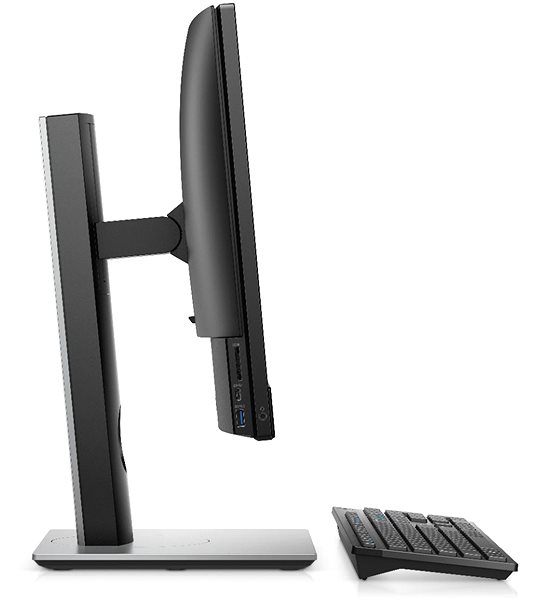
Small design with hardware hiddin within the monitor
SSD capacity: 256 GB
Dell all in one pc RAM size: 8 GB
Perfect image quality thanks to the 21,5" IPS display
Screen resolution: 1920 × 1080 px
Dell OptiPlex 3280 is equipped with the Intel Core i3 10100T Comet Lake processor
Intel UHD Graphics 630 graphics card
Integrated reader for memory cards
WiFi module for easy internet connection
Integrated webcam
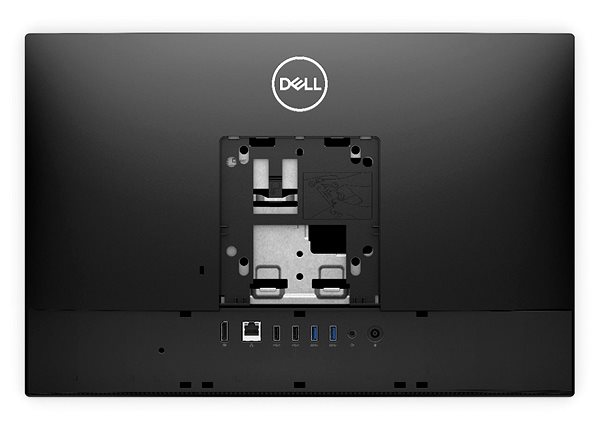
DisplayPort video port for connection to an external monitor
You will find 2× USB 2.0 ports for connecting other electronics
3× Practical USB 3.2 Gen 1 (USB 3.0) ports available
Additional equipment includes LAN, audio input (line in) and audio output (line out)
Dell OptiPlex 3280 all in one pc comes with Windows 10 Pro
The packaging includes mouse and keyboard
What kind of processor and is built into the Dell OptiPlex 3280?
The basis of computing power in this computer is the quad-core Intel Core i3 10100T Comet Lake processor that runs at a frequency of 3 GHz. In the Turbo Boost mode, it will run at 3,8 GHz. The smooth running of the machine is guaranteed by the DDR4 RAM with a size of 8 GB. This RAM is installed in one of the 2 slots that the machine is equipped with. Dell OptiPlex 3280 is designed with 256 GB of memory for programmes installation and data. A very fast SSD will serve as the drive. This type of drive without mechanical parts is fast and reliable, and it resists shocks very well. For the graphics, the Dell OptiPlex 3280 all in one pc relies on the Intel UHD Graphics 630.
The Monitor and Connectivity on the Dell OptiPlex 3280 All-In-One PC
The monitor on this computer has a resolution of 1920 × 1080 px. Its size of 21,5" won't take up too much of your space but is large enough that working with it will be comfortable. The image quality is ensured by the IPS technology, bringing vivid colouration and good viewing angles. The Dell all in one pc has a wide connector array for the easy connection of your various accessories. This includes the crucial 2 USB 2.0 connectors, and even 3× USB 3.2 Gen1 (USB 3.0) connectors as well.. It also has an interface of the popular modern USB-C. A LAN port is available for easy connection to the internet, so you don't have to rely only on a WiFi connection. The Dell OptiPlex 3280 all in one pc is also equipped with the DisplayPort interface for the connection of an external monitor. The equipment is complemented by Bluetooth.
Generally, the higher the number, the more powerful the processor. For an office PC, a basic processor series will be more than sufficient, but for more challenging work and gaming you will require a more advanced processor.
Denotes the distance between the lower left and upper right corner of the screen. It is quoted in inches,while 1 "= 2.54 cm. How big a diagonal measurement to choose with which device and what are the benefitsand the disadvantages?
Denotes the distance between the lower left and upper right corner of the screen. It is quoted in inches,while 1 "= 2.54 cm. How big a diagonal measurement to choose with which device and what are the benefitsand the disadvantages?
The resolution specifies the number of pixels (pixels) that are displayed horizontally and vertically on a screen. The higher the resolution, the sharper and more detailed the image.
Generally, the higher the number, the more powerful the processor. For an office PC, a basic processor series will be more than sufficient, but for more challenging work and gaming you will require a more advanced processor.
One of the main parameters of the processor, indicating the number of instructions that the processor can execute in 1 s. The higher frequency, the better working efficiency of the processor.
Počet jadier v procesore ovplyvňuje výkon vášho stolného počítača. Viac jadier znamená väčšie možnosti pre multitasking, rýchlejšie spracovanie náročných aplikácií a celkovo vyššiu výkonnosť. Ako ale zistiť, koľko jadier potrebujete? V tomto článku sa pozrieme na to, čo znamená počet jadier, ako ovplyvňuje výkon vášho desktopu, a poradíme, podľa čoho sa pri výbere orientovať.
Hardware memory designed to speed up the process of accessing data from the main memory. The larger the value, the greater the speed. A normal value is 2 MB
Allows individual processor cores to run faster than the base frequency, assuming that circumstances (current consumption, temperature of cores) permit it. Intel processors are equipped with turbo...
TDP procesora (Thermal Design Power) je najvyšší možný tepelný výkon procesora, ktorý môže byť dosiahnutý pomocou štandardných aplikácií. Udáva, aké veľké množstvo tepla potrebuje chladiaci systém počítača odviesť od procesora, aby ho ochránil pred príliš vysokými teplotami, ktoré nebude schopný uniesť. Hodnota navrhnutého tepelného výkonu je výrobcom špecifikovaná pre každú súčiastku (procesory, ale aj grafické karty, a podobne). Vyššie TDP majú spravidla výkonnejšie procesory. S jeho vzrastajúcou hodnotou však rastú tiež nároky na chladenie. Jednotkou TDP je Watt.
Socket is on the motherboard and is used for fitting of the processing unit (CPU). Processors from individual producers and different generations are not compatible with each other.
HDD and SSD drives are used for permanent storage of data on computers and laptops. But what are the differences between the two, and what are their advantages?
The USB 2.0 interface allows you to connect a wide range of equipment. It can be useful for connecting keyboards and mice, and is also suitable for printers, external drives, flash drives...
USB 3.0 is 10 times fater than its predecessor (with which it is backwards compatible). The maximum data transmission speed can be used with flash drives, portable drives and external drives that...
Contains a list of basic equipment, which is supplied with the product. For sets it is mostly a mouse with a keyboard or optical mechanics.
Keyboard, Mouse
Product series
PC series
Dell Optiplex
More Specifications
Dell Products, Raheen Business Park, Limerick, Ireland, [email protected], www.dell.com
This American multinational corporation based in Round Rock (Texas, USA) is a leading player in the field of information technology. The Dell brand carries the hallmark of quality and is known throughout the world. In 2010, it ranked fifth in the poll of most admired computer companies.
Dell's operations are incredibly broad - the company can be found not only in personal computers, servers, storage devices, switches, software and peripherals, but also HDTV, cameras, printers and MP3 players. The company, whose history began in 1984, now ranks among the giants in the field.
Note:
Specifications can be changed without notice. Images are for illustrative purposes only.
Dobrý den. Je nutno pořídit si k počítači externí zdroj, nabo je zdroj vestavěn? A dodávaná myš je bezdrátová?
Dobrý den. Je nutno pořídit si k počítači externí zdroj, nabo je zdroj vestavěn? A dodávaná myš je bezdrátová?
Try our cookiesAlza.cz a. s., Company identification number 27082440, use cookies and other data to ensure the proper functioning of the website and, with your consent, also, among other things, to personalize advertising and the content of our websites. By clicking on the “I understand“ button, you agree to the use of cookies and the transfer of data regarding the behavior on the website for displaying targeted advertising on social networks and advertising networks on other websites.
We use 8 categories of cookies on our website:
Technical cookies
These are strictly necessary for the functioning of the website and the features you choose to use. Without them, our website would not work; you wouldn't be able to log in to your user account, for example.
Functionality cookies
These cookies allow us to remember your basic choices and improve the user experience. These include remembering your preferred language or allowing you to stay logged in permanently.
Social media cookies
These cookies allow us to easily link you to your social media profile and, for example, allow you to share products and services with your friends and family.
Content personalisation
These cookies allow us to show you content and ads according to the information we have about you to best meet your needs. This includes what content you have viewed, or on what device you are accessing our website.
Non-personalised advertising
These cookies allow us to show you general ads for products and services.
Personalised advertising
Thanks to these cookies, we and our partners can offer you relevant products and services based on your purchases, your shopping behaviour and your preferences.
Audience metrics
These cookies allow us to optimise our site for your convenience based on how you use it. The aim is to remember or anticipate your choices. This includes, for example, the use of features, their location, or the behaviour on the page.
By giving your consent to the processing of cookies, functionality and analytical cookies will be installed on the device you use to browse the website (click on the "I understand" button for both categories, or you can select only one of the categories by clicking on the "Settings" button). We always install technical cookies on your device, even without your explicit consent, because without them our website would simply not work.
You can revoke your consent to the processing of cookies. In connection with our company's cookie processing, you also have the following rights: the right to access cookies, delete, modify, supplement and correct them, restrict processing and the right to lodge a complaint with the Office for Personal Data Protection. Read more about your rights.